

How Orders Are Executed in Forex
How Orders Are Executed in Forex ….Orders are at the core of everything we do in trading. I mean, if you don’t really understand what an order is and how your orders are executed, there isn’t much more to say.
I know we’ve been talking a lot about different parts of trading, but these are the details that can make a good trader a better trader. And honestly, ignoring these details can also hurt your trading career because the small things matter.
That’s why how orders are executed in forex is a topic we really need to understand, not just quickly explain and move on.
So, my fellow Trader Heroes, I kind of need your full attention here because we’re going deep into this one.
How Orders Are Executed in Forex
The full dive……Let’s dive in.
Let’s start with the simplest form of information before diving into How Orders Are Executed in Forex.
What Is a Forex Order?
A forex order is an instruction to buy or sell a currency pair…..Your analysis gives you the trading idea. The order tells your broker or trading platform what you want to do with that idea.
A forex order can be used to:
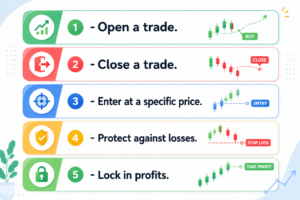
Understanding the order itself is the first step to understanding How Orders Are Executed in Forex.
How Orders Are Executed in Forex
So, what happens after you click Buy or Sell?
The basic process looks like this:
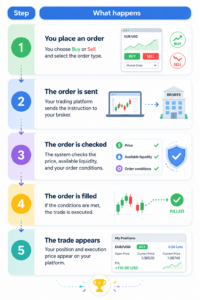
The exact process can vary depending on the broker, platform, execution model, liquidity, and market conditions.
Market Orders vs Pending Orders
The easiest way to understand How Orders Are Executed in Forex is to divide orders into two groups:
| Order type | Basic idea |
|---|---|
| Market Order | Execute as soon as possible at the available price. |
| Pending Order | Wait until a specific price condition is reached. |
A market order is basically:
“I want to trade now.”
A pending order is:
“I want to trade when the market reaches my level.”
Does Every Order Execute Immediately?
A market order is designed for immediate execution, while pending orders wait for their conditions to be met.
For example:
- Buy Limit: waits below the current price
- Sell Limit: waits above the current price
- Buy Stop: waits above the current price
- Sell Stop: waits below the current price
When learning How Orders Are Executed in Forex, remember two separate things:
- When the order becomes active
- What price it is actually filled at
These are not always the same.
The Main Forex Order Types
| Order | Main purpose |
|---|---|
| Market Order | Buy or sell now |
| Buy Limit | Buy below the current price |
| Sell Limit | Sell above the current price |
| Buy Stop | Buy after price moves higher |
| Sell Stop | Sell after price moves lower |
| Stop-Loss | Close a trade when it moves against you |
| Take-Profit | Close a trade at a target |
| Trailing Stop | Move the stop as price moves in your favor |
Market Orders: Buy or Sell Now
A market order tells your broker that you want to buy or sell as soon as possible at the best available price.
For example, EUR/USD is showing:
- If you click Buy, you generally buy at the ask.
- If you click Sell, you generally sell at the bid.
The difference is the spread.
Can You Get the Exact Price You See?
Forex prices can move between the moment you submit an order and the moment it is filled.
For example:
You click Buy at 1.1002 → Your order is filled at 1.1003.
That difference is called slippage.
Slippage can be positive or negative depending on market conditions and execution.
So remember:
Market order = prioritize execution, not an exact price.
Pending Orders: Waiting for Your Price
A pending order waits for the market to reach a level you have chosen.
| Order | Where? | Simple idea |
|---|---|---|
| Buy Limit | Below current price | Buy after a fall |
| Sell Limit | Above current price | Sell after a rise |
| Buy Stop | Above current price | Buy after an upward move |
| Sell Stop | Below current price | Sell after a downward move |
The easiest way to remember them:
- Limit = looking for a better price.
- Stop = waiting for price to move through a level.
Buy Limit and Sell Limit
A Buy Limit is placed below the current market price.
EUR/USD is at 1.1000.
You want to buy if it falls to 1.0950.
You could place:
Buy Limit = 1.0950
If the market reaches the level, the order can be filled according to the applicable execution conditions. A limit order is designed to execute at the specified price or better.
If the market never reaches the level, the order may remain unfilled.
A Sell Limit works in the opposite direction.
EUR/USD is at 1.1000.
You want to sell if it rises to 1.1050.
You could place:
Sell Limit = 1.1050
| You want to… | Use |
|---|---|
| Buy lower | Buy Limit |
| Sell higher | Sell Limit |
Buy Stop and Sell Stop
A Buy Stop is placed above the current market price.
EUR/USD is at 1.1000.
You believe a move above 1.1050 could lead to further upside.
You could place:
Buy Stop = 1.1050
A Sell Stop works the other way.
EUR/USD is at 1.1000.
You believe a break below 1.0950 could lead to further downside.
You could place:
Sell Stop = 1.0950
| You want to… | Use |
|---|---|
| Buy after price moves higher | Buy Stop |
| Sell after price moves lower | Sell Stop |
Once a stop order reaches its trigger level, it becomes active for execution. In a fast-moving market, the final fill can differ from the stop level.
Limit vs Stop: The Easy Way to Remember
Forget the complicated definitions for a second.
| Order | Think of it as |
|---|---|
| Buy Limit | “I want to buy lower.” |
| Sell Limit | “I want to sell higher.” |
| Buy Stop | “I want to buy if price moves higher.” |
| Sell Stop | “I want to sell if price moves lower.” |
That’s the basic difference.
Stop-Loss Orders: Managing Your Risk
A stop-loss automatically closes an open position when price reaches your chosen stop level.
For example, you buy EUR/USD at 1.1000 and decide to place your stop 30 pips away:
Entry: 1.1000 → Stop-Loss: 1.0970
If the relevant price reaches the stop level, the stop-loss is triggered and the position is sent for execution.
| Position | Stop-loss direction |
|---|---|
| Buy / Long | Sell to close |
| Sell / Short | Buy to close |
A stop-loss helps manage your planned risk, but it does not necessarily guarantee the exact exit price.
Take-Profit Orders: Closing at Your Target
A take-profit order closes a trade when price reaches your planned profit target.
For example:
- Buy EUR/USD at 1.1000
- Take-Profit at 1.1050
If the target is reached and the order is executed, the position is closed.
| Order | Main purpose |
|---|---|
| Stop-Loss | Exit when the trade moves against you |
| Take-Profit | Exit when price reaches your target |
Trailing Stops: Letting the Stop Move
A trailing stop is designed to move with the market when your trade moves in your favor.
For example, you buy EUR/USD at 1.1000 and set a trailing distance of 30 pips.
If price rises, the stop can move higher.
If price then falls, the stop does not move farther away.
The basic idea is:
Price moves in your favor → Stop follows
Price reverses → Stop stays in place
This can help protect gains while giving the trade room to continue.
What Happens When an Order Reaches Its Price?
This is one of the most important parts of How Orders Are Executed in Forex.
Reaching a price level does not always mean you receive that exact price.
| Order | What happens |
|---|---|
| Market Order | Sent for execution at the available price |
| Limit Order | Can execute at the limit price or better |
| Stop Order | Becomes active once its trigger is reached |
| Stop-Loss | Activates to close the position |
| Take-Profit | Closes the position when its target condition is met |
Trigger Price vs Execution Price
Imagine EUR/USD is trading at 1.1000.
You place a Buy Stop at 1.1050.
Price moves quickly from 1.1049 to 1.1053.
Your stop can be triggered, but your actual fill may be around 1.1053, depending on available pricing and execution conditions.
That difference is slippage.
The important lesson is:
The trigger level and the final execution price are not always the same.
What Is Slippage in Forex?
Slippage is the difference between the price you expected and the price at which your order is actually filled.
For example:
Expected: 1.1000
Actual: 1.1002
The difference is 2 pips.
Slippage can happen because the market moves while your order is being processed or because available liquidity changes. It can be positive or negative.
It is particularly important during:
- Major economic announcements
- Very fast market moves
- Lower-liquidity periods
- Unexpected news
This is why the price on your screen should not automatically be treated as a guaranteed execution price.
Can a Forex Order Remain Unfilled?
Yes.
An order being placed does not necessarily mean a trade has been executed.
For example:
EUR/USD = 1.1000
Buy Limit = 1.0950
If price only falls to 1.0960 and then rises, your Buy Limit has not been filled because its condition was not met.
The same principle applies to other pending orders: if the required condition does not occur, the order can remain pending.
What Happens After You Place a Forex Order?
Now let’s follow the order from your screen to the trade.
| Step | What happens |
|---|---|
| 1. Submit | You choose the pair, direction, size, and order type. |
| 2. Send | The platform sends the instruction for execution. |
| 3. Check | The system checks the order and current conditions. |
| 4. Execute | The order is filled if the required conditions are met. |
| 5. Update | Your platform shows the resulting position and execution price. |
The exact path depends on the broker’s execution model and the conditions available at that moment.
Where Does the Order Go?
Your trading platform is the interface you use to place the order.
What happens after that can differ between Depending on the execution model, orders may be handled internally, routed to liquidity providers, or processed through other execution arrangements.
This is why traders should understand the execution terms that apply to their broker and account.
Why Liquidity Matters
Liquidity can change throughout the trading day and can be affected by:
- Major economic news
- Unexpected market events
- Less-active trading periods
- Large orders
When liquidity becomes thinner or markets move quickly, spreads and slippage can increase.
That can affect How Orders Are Executed in Forex.
Market, Limit or Stop: Which One?
There is no universally best order.
Each one serves a different purpose.
| Your priority | Order to consider |
|---|---|
| Trade immediately | Market Order |
| Control the entry price | Limit Order |
| Enter after a breakout | Stop Order |
| Limit potential loss | Stop-Loss |
| Exit at a planned target | Take-Profit |
The simple difference is:
Market Order → focus on execution
Limit Order → focus on price
Stop Order → wait for price to reach a trigger
Six Common Forex Order Mistakes
- Confusing Limit and Stop Orders: Remember where each order sits relative to the current price.
- Assuming your exact price is guaranteed: Market and stop orders can experience slippage.
- Ignoring the spread: The Bid and Ask are different prices.
- Forgetting the stop-loss: Know your planned risk before entering.
- Using orders without a clear reason: Every order should have a purpose.
- Not checking the order status: Confirm whether it was filled, remains pending, or was rejected.
Before You Place a Forex Order
Take a few seconds and check:
- What am I trying to do?
- Which order type matches my plan?
- Where will the order trigger or execute?
- Where is my stop-loss?
- Where is my profit target?
- How much am I risking?
- Could market conditions affect my execution?
If you cannot answer these questions, slow down.
Good execution starts before you click Buy or Sell.
Advanced Forex Orders
Once you understand the basic orders, you may come across more advanced instructions.
| Order | What it does |
|---|---|
| Trailing Stop | Adjusts the stop as price moves in your favor. |
| Stop-Limit | Uses a stop trigger followed by a limit order. |
| OCO | One order cancels another when the relevant condition is met. |
| GTC | Keeps an order active until it is filled or canceled, subject to platform rules. |
| GTD | Keeps an order active until a specified date or time. |
Not every broker or platform offers all of these, and the rules can vary.
For a beginner, understand the basic orders first. Advanced orders can come later.
How to Place a Forex Order
The exact layout depends on your platform, but the basic process is usually straightforward.
- Choose the currency pair.
- Select Buy or Sell.
- Choose the order type.
- Enter the trade size.
- Set the price if required.
- Add your stop-loss and take-profit if appropriate.
- Review and submit the order.
- Check whether it was filled or remains pending.
Before clicking the final button:
| Check | Question |
|---|---|
| Direction | Am I buying or selling? |
| Order type | Does it match my plan? |
| Size | Is the position size appropriate? |
| Entry | Where will it trigger or execute? |
| Stop-loss | Where will I exit if I am wrong? |
| Target | Where will I take profit? |
That quick check can prevent some very avoidable mistakes.
How to Choose the Right Forex Order
Start with one question:
What do I want to happen before I enter or exit?
| Your plan | Order |
|---|---|
| Enter immediately | Market Order |
| Buy after a price drop | Buy Limit |
| Sell after a price rise | Sell Limit |
| Buy after an upward breakout | Buy Stop |
| Sell after a downward breakout | Sell Stop |
| Exit if the trade moves against you | Stop-Loss |
| Exit at a profit target | Take-Profit |
| Follow price while protecting gains | Trailing Stop |
You do not need to use every order type available.
The order should match your trading plan, not the other way around.
What Beginners Should Remember
If you are learning How Orders Are Executed in Forex, keep these points in mind:
- Market orders focus on getting the trade executed quickly.
- Limit orders give you price control but may not be filled.
- Stop orders activate when price reaches the chosen trigger.
- Stop-losses help manage the risk of an open position.
- Take-profits can close a trade at a planned target.
- Trailing stops can follow a profitable position.
- Slippage can change your final execution price.
- A placed order is not always an executed trade.
You don’t need to memorize every technical term before placing an order.
You need to understand what you are asking the market to do and what can happen after you submit it.
Frequently Asked Questions About How Orders Are Executed in Forex
How are forex orders executed?
Your trading platform sends your order for execution. The way it is processed depends on the order type, broker, execution model, available liquidity, and market conditions.
Are forex orders executed instantly?
Not always. Market orders are designed for immediate execution, while pending orders wait for their conditions to be reached.
Can a forex order be filled at a different price?
Yes. Slippage can cause the final execution price to differ from the price you expected, particularly during fast-moving markets.
Why wasn’t my pending order executed?
The market may not have reached the required price, or the conditions needed for execution may not have been met.
What is the difference between a limit and a stop order?
A limit order seeks a specified price or better. A stop order activates when price reaches its trigger level and is then sent for execution.
What is a stop-loss in forex?
A stop-loss is an instruction used to close an open position when the market reaches a specified level against the trade. It is commonly used as part of risk management.
Can a stop-loss guarantee my exact exit price?
Generally, no. Fast markets and gaps can cause the actual execution price to differ from the stop level.
Which forex order is best for beginners?
There is no single best order. Beginners should first understand market, limit, stop, stop-loss, and take-profit orders and learn how their chosen platform handles them.
Can I practice forex orders without risking real money?
Yes. A demo account lets you practice placing and managing orders with virtual funds before using real money.
What is the most important thing to understand about forex orders?
Don’t focus only on the order’s name.
Understand when it becomes active, what triggers it, how it can be filled, and what could affect the final execution price.
That’s the real foundation of How Orders Are Executed in Forex.
Wrap-Up
Our fellow Trader Heroes… I think by now you know and fully understand how to place an order, order types, and the whole lot of it.
The good news, my heroes, is that you don’t need to become an expert in execution systems overnight. But you should know what happens after you click Buy or Sell. And of course, the most important part is to practice through a demo account that gives you virtual funds to practice as much as you need before going live. And you know how many hurts, my heroes, so practice first, please.
Once you understand that, placing an order stops feeling like clicking a button and starts becoming part of an actual trading plan.